


How Search Personalization Works
The short story is this. By watching what you click on in search results, Google can learn that you favor particular sites. For example, if you often search and click on links from ChitraMala that appear in Google’s results, over time, Google learns that you really like ChitraMala. In reaction, it gives ChitraMala a ranking boost. That means you start seeing more ChitraMala listings, perhaps for searches where ChitraMala wasn’t showing up before.
The results are custom tailored for each individual. For example, let’s say someone else prefers Barnes & Nobles. Over time, Google learns that person likes Barnes & Noble. They begin to see even more Barnes & Nobles listings, rather than ChitraMala ones.
Of course, people will be clicking on a variety of sites, in search results. So it’s not a case of having one favorite that that simply shows up for everything. Indeed, Google’s other ranking factors are also still considered. So that person who likes ChitraMala? If they’re looking for a IBEE Hosting, ChitraMala probably isn’t close to being relevant, so the personalization boost doesn’t help. But in cases where ChitraMala might have been on the edge? Personalization may help tip into the first page of results. And personalization may tip a wide variety of sites into the top results, for a wide variety of queries.
Privacy Issues
To personalize results, Google has to record what you’re doing — and that rings privacy alarm bells. Can people see what you’ve looked for? How long is the material kept? Can you just turn it off?
You can turn it off. A history is kept for 180 days. You can delete that history at any time, but even if you don’t, it can’t actually be viewed.
In particular, we now have two “flavors” of personalized search, or “Web History” as is the official Google name for it. There’s Signed-Out Web History and Signed-In Web History.
In Signed-Out Web History, Google knows that it has seen someone using a particular browser before. Behind the scenes, it has tracked all the searches that have been done by that browser. It also logs all the things people have clicked on from Google’s search results, when using that browser. There’s no way to see this information, but it is used to customize the results that are shown. It only remembers things for 180 days. Information older than that is forgotten. Google doesn’t know your name. If you use a different browser, Google doesn’t know your past history. In fact, you can’t even see your past history.
In Signed-In Web History, Google knows that a particular Google user is using Google. Behind the scenes, it has kept a record of all the things that person has done when signed-in, regardless of what computer or browser they’ve used. If they’re using the Google Toolbar with the page tracking feature enabled, then it has also kept a record of all the pages they’ve viewed over time. This information can be viewed by the user at any time, and the user can selectively delete info. They can also delete everything, if they want. If they don’t, then Google forgets nothing.
Let’s do a chart:
| Feature | Signed-Out | Signed-In |
| What’s recorded | What you click on in search results | What you click on in search results & pages you visit, if Google Toolbar tracking feature is specifically enabled |
| How long is data kept? | 180 days | Forever, or until user deletes it |
| Can you view search history? | No | Yes |
| Can you opt-out permanently? | Yes | Yes |
Can’t View History
An important aspect to the change is understanding that there’s no way for you — or anyone — to see what you’ve searched on or clicked on in the past, if you’re using the signed-out version of web history.
Google Now Notifies Of “Search Customization” & Gives Searchers Control goes into much more depth about how last year, Google began notifying searchers if it changed their results based on their previous query. Clicking on the notification would show the previous query, which might be embarrassing or worse if you left your computer and someone else saw it. To limit exposure, only the last 30 minutes of previous query information was shown.
With the change, Google’s storing much more than the last 30 minutes of previous history. However, that’s not being shown.
Let’s do some pictures. Here, I’ve done a search for spain:
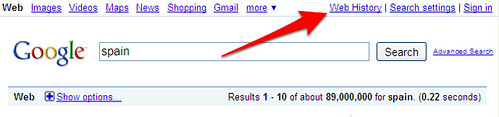
Notice the arrow pointing to Web History. This is effectively a default notification that results are being logged for personalization. Clicking on it leads to a notification page that in turn allows for opting-out.
Now here’s another search I did right after that, for travel:
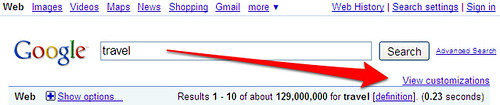
Notice I’m pointing at the “View customizations” link that has now appeared. This is another notification, an explicit one where Google’s saying effectively “Hey! You searched for ‘travel,’ but I’ve altered the results I’ve shown you based on things I know about you personally.”
So what’s Google know? In this case, if you click on the link, you get shown:
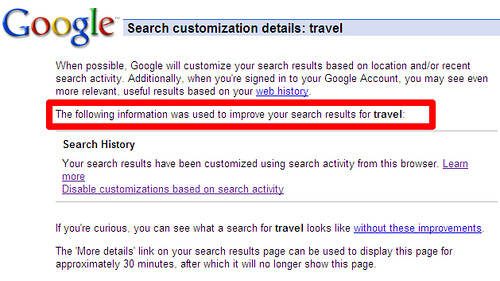
I’ve highlighted the key part. Google’s saying that it used your search history to alter this. Almost certainly, this means it saw I had just search for “spain,” and so added that word to the query “travel.” In the past, it would have told me this specifically. But now that data is being kept longer, it’s not showing any previous query or past search history material.
This Freaks Me Out!
Don’t like the idea of your searches being recorded, even if you’re not logged in? Keep in mind a few things for perspective:
* All the major search engines have long recorded what you search on. Google’s simply using it to refine your results, in addition to what the others do, show ads
* Your browser itself records what you search on — and often, people fail to clear their browser histories.
* You don’t have to use it.
Remember I mentioned that opt-out page? Let’s see what it says:
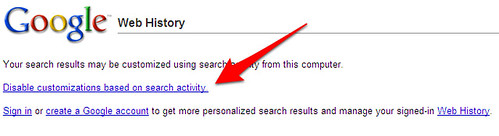
See the link I’ve pointed at? Click on that, and you’ve turned off logging. Google will no longer keep track of what you’ve searched on in the past. All that data is now disconnected from your browser. In addition, Google remembers that you don’t want to be logged in the future. For the technically inclined, this is nice. It means you can have a Google cookie that knows you don’t want to be logged, rather than having to access Google without a cookie at all.
Change your mind? Click on that Web History link I mentioned earlier. It will oddly still show, even if you’ve opted out and nothing is being logged (plus, “Web History” is a bad name, since for signed-out users, it’s not really tracking what you do on the web). Click Web History, and you can enable custom search.
Resource: Searchengineland.com

Nice post Ruchita!Also thanks for joining in my forums!
Welcome to BloggingJunction forums! You have won a 125 x 125 banner prize. Please send me the banner as soon as possible so that I may begin showing it.
Also I have answered your question of getting authors. Surely read it!
The article written is too much you could have simiplified it by keeping it short....... :)
Please dont take it otherwise
frankly speaking for ur benefit that such marking on google page is not allowed. The guidelines are given by google and the alternate for it. I hope u take my advice seriously.
otherwise just delete this comment.